Card terminals exist in China, but everyday life runs on QR codes: metro gates, taxis, convenience stores, night markets. Setting up Alipay once — before you fly — removes nearly all payment friction from your trip. The international version of Alipay was built exactly for this: your foreign phone number, your passport, and a Visa/Mastercard are all you need.
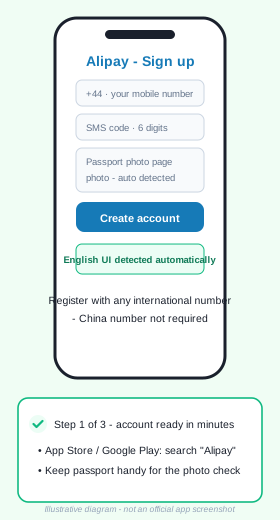
Step 1 — Install and register (3 minutes)
Download Alipay from the App Store or Google Play — the interface is offered in English automatically for foreign app stores. Sign up with your international mobile number, request the SMS code, and verify your identity by photographing your passport photo page when prompted. No Chinese number, bank, or ID card is involved.
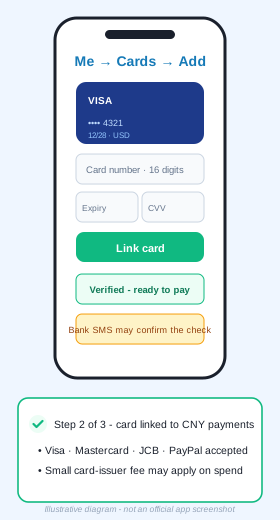
Step 2 — Bind your card (5 minutes)
Open Me → Cards → Add Card, enter your Visa, Mastercard, or JCB details — or link PayPal where available. The verification check runs in seconds; your bank may send a confirmation SMS. The card stays in your home currency and is charged in CNY at the day's rate, with a small card-issuer fee possible. Add a second card as backup if you have one.
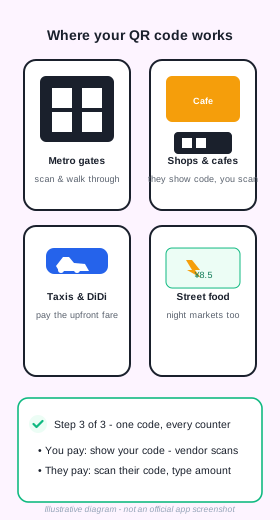
Step 3 — Pay anywhere (the whole point)
Two flows cover everything. You pay: tap Pay/Buy and show your personal QR code — the vendor scans it, from metro gates to noodle stands. They charge: tap Scan, point at the vendor's code, type the amount (it may pre-fill), confirm. Both settle against your linked card automatically.
Practical notes from the road
- Keep 300–500 CNY (about $40–70) in cash for very small vendors and rural stops — cash is accepted everywhere in China.
- Chip+PIN is the norm at Chinese terminals: know your card's PIN even when paying by QR.
- Alipay also hosts mini-programs — including DiDi for ride-hailing and official train services — inside the same app.
- Public transport apps and some station machines accept Alipay's QR directly.
- Hotels and mid-range restaurants almost always take physical Visa/Mastercard too, so you always have a fallback.
Troubleshooting
Card add fails? Double-check the card supports CNY settlement (most Visa/Mastercard do), then retry after your bank's SMS confirmation. Scan does nothing? Your camera permission may be off — enable it in phone settings. Amount looks wrong? Verify the currency line shows CNY before confirming; merchants occasionally type a test amount first.
Want this plus eSIM, maps and ride-hailing in one printable file?
Get the free PDF guide Back to Payment Guide